




Sana List Knowledge Base
How to Create an Ordinary Listing on Sana List
Ready to sell on Sana List? This guide explains how to create a strong ordinary listing that showcases your product, service or offer to buyers across Kenya with clear details, quality images, accurate pricing and SEO-friendly content.
Quick Answer
What is an ordinary listing on Sana List?
An ordinary listing is a standard classified ad on Sana List. It is ideal for selling a single product, advertising a service, listing an item for sale or promoting a local offer. A good ordinary listing includes a clear title, category, price, condition, description, photos, location and contact details.
Listing Type
Ordinary Classified Ad
Best For
Products, Services and Local Offers
Target Audience
Buyers Across Kenya
Main Goal
Get More Buyer Inquiries
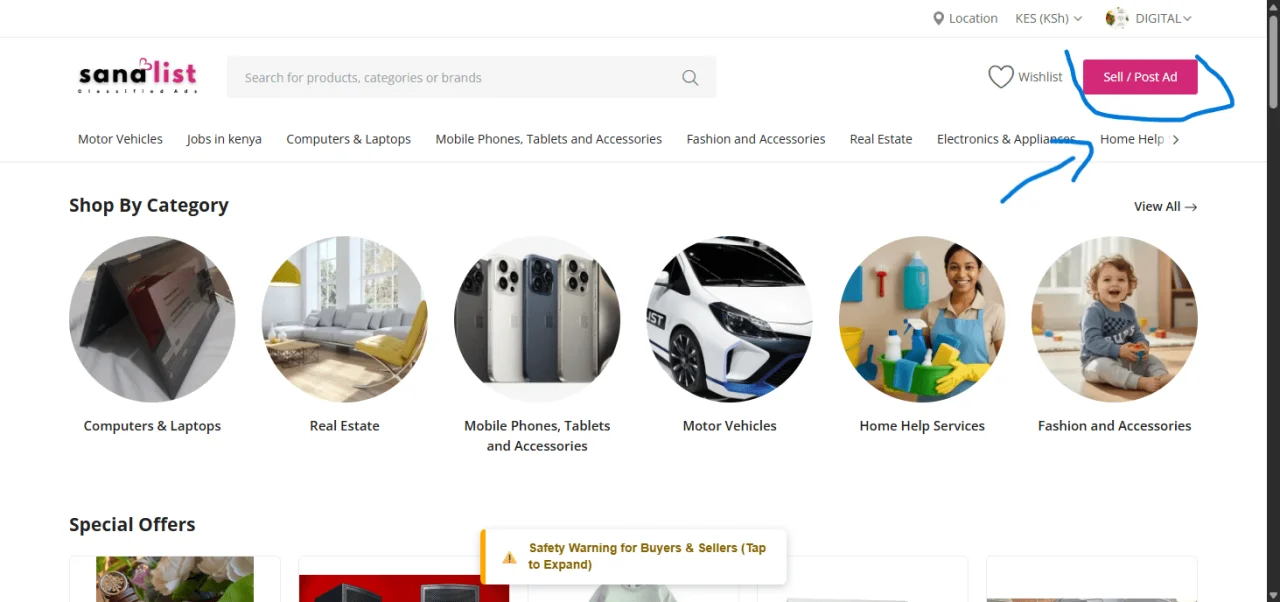
Quick Start: How to Create an Ordinary Listing
Follow this step-by-step process to create a complete, search-friendly and buyer-focused ordinary listing on Sana List.
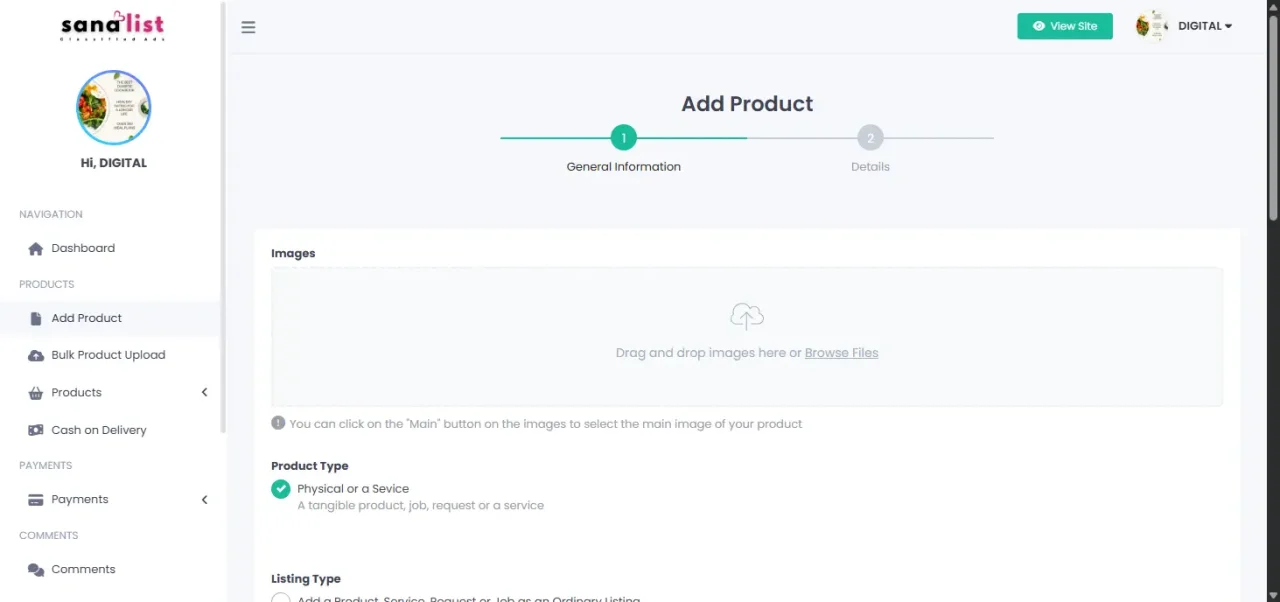
Step 1: Start Your Listing
Click Sell or use the dashboard listing button, then choose Ordinary Listing from the available ad type options.
Step 2: Fill in Product Details
Enter the listing title, category, subcategory, price, condition and other core details buyers need before contacting you.
Step 3: Write the Description
Add a short SEO description and a detailed full description explaining features, condition, specifications, inclusions and benefits.
Step 4: Add Photos and Media
Upload clear product photos from different angles and add a video link if you have a product demonstration or service showcase.
Step 5: Add Location and SEO Keywords
Set your county, town and area details, then add relevant keywords buyers may use when searching for your product or service.
Step 6: Review and Publish
Check your title, price, contact details, photos, description and location before submitting the listing for review and approval.
Detailed Field Instructions for Sellers
Complete fields make your listing easier to understand, easier to search and more convincing to buyers.
Core Listing Information
Title
Use a clear, specific and searchable title. Example: Genuine Leather Office Chair Executive Swivel in Nairobi.
Category and Subcategory
Choose the most relevant category so the right buyers can find your listing quickly.
Price
Enter the price in KES and mark it as negotiable only if you are open to offers.
Condition
Be honest about whether the item is new, used like new, used good or needs attention.
Description and SEO
Short Description
Write a one or two sentence summary for search visibility and buyer scanning. Include the main product or service keyword naturally.
Full Description
Explain features, specifications, dimensions, condition, warranty, inclusions, delivery terms and why the buyer should contact you.
SEO Keywords
Add buyer search terms such as office chair Nairobi, ergonomic chair Kenya, leather executive chair or furniture for sale Nairobi.
Media and Links
Photos
Upload 3 to 5 clear, well-lit photos from different angles. For used items, show imperfections honestly.
Demo Video URL
Add a YouTube link if a video can help buyers understand the product, service, machine, property or vehicle better.
External Link
Use a relevant WhatsApp, business website or social media link if it helps buyers contact you or verify your business.
Location Details
County
Choose the correct county to help buyers search by region.
City or Town
Add the nearest city or town such as Nairobi, Mombasa, Thika, Kisumu, Nakuru or Eldoret.
Specific Area
Mention the estate, road, landmark or pickup area if it helps buyers plan viewing or delivery.
Ordinary Listing Success Flow
A strong listing should move buyers from search to trust, then from interest to inquiry.
Searchable Title
Use product, brand, model and location where relevant.
Clear Price
Give buyers a realistic price and negotiation status.
Real Photos
Show the actual item, not misleading or unrelated images.
Complete Description
Answer common buyer questions before they contact you.
Fast Response
Reply quickly to turn views into serious inquiries.
Pro Tips for Creating a Better Ordinary Listing
Use these tips to improve buyer trust, listing quality and visibility.
Image Quality Matters
Use good lighting, a clean background and multiple angles. Clear images help buyers trust the listing.
Be Transparent
Mention flaws, missing accessories, repairs or usage history to avoid misunderstandings.
Price Smart
Research similar listings and set a fair price based on condition, demand, location and included extras.
Respond Quickly
Check calls, messages and WhatsApp regularly. Fast response can help you close deals before buyers move to another seller.
Ordinary Listing SEO Checklist
Before publishing, check that your listing contains the details buyers and search engines need to understand your offer.
Clear product or service title
Main keyword included naturally
Correct category and subcategory selected
Accurate KES price added
Condition stated honestly
Short SEO description written
Detailed full description added
3 to 5 clear photos uploaded
County, city and area included
Contact or WhatsApp link checked
Delivery or pickup terms explained
Spelling and price reviewed before publishing
Frequently Asked Questions About Ordinary Listings
These answers help sellers understand how to create and improve ordinary listings on Sana List.
What is an ordinary listing on Sana List?
An ordinary listing is a standard classified ad used to advertise a product, service or local offer on Sana List. It includes details such as photos, price, description, condition and location.
How do I create an ordinary listing?
Log in to Sana List, open the listing creation page, choose Ordinary Listing, fill in the product or service details, upload photos, add location information and submit the listing for approval.
What should I include in my listing title?
A good title should include the product or service name, brand, model, condition or location where relevant. Clear titles help buyers understand your offer quickly.
How many photos should I upload?
Upload at least 3 to 5 clear photos showing the item from different angles. For used items, include photos of any visible flaws to build trust.
What happens after I submit my listing?
After submission, the listing may be reviewed to ensure it meets platform guidelines. Once approved, it can go live and start attracting buyers on Sana List.
Ready to List on Sana List?
Once you submit your listing, review it carefully and make sure your information is accurate. A complete listing with clear images, honest details and active contact information has a better chance of attracting serious buyers.
Need help creating your listing?
Contact the Sana List support team for help with listing creation, account access, product uploads or ad publishing.
Create a clear ordinary listing and start reaching buyers on Sana List.
Add the right title, photos, price, location and description to make your listing easier to find and easier to trust.
© 2026 Sana List | Kenya Online Classified Ads Marketplace