




Quick Answer
How do you boost a listing on SanaLIST?
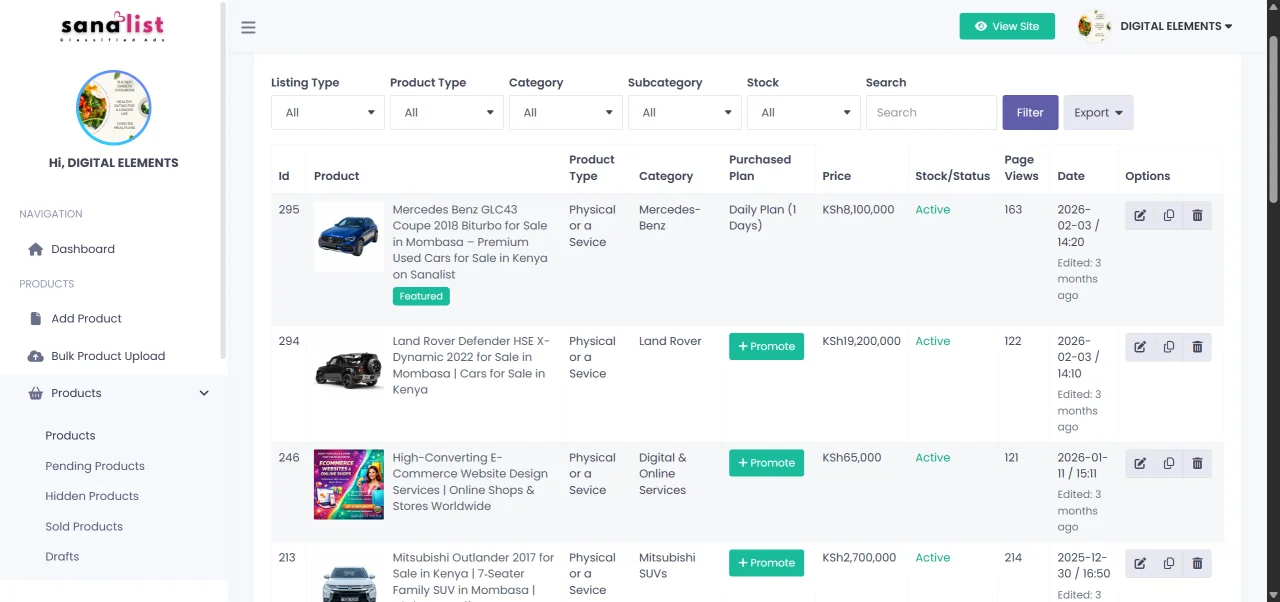
To boost a SanaLIST listing, log in to your account, open your dashboard, find the listing you want to promote, select the available promotion option, choose your preferred duration and follow the payment instructions displayed on the platform. Where wallet funding is required, top up your SanaLIST Wallet and complete the promotion process from your account.
Good to know: A stronger listing can improve the value of promotion. Use clear photos, accurate pricing, a useful title, complete descriptions and the correct category before boosting.
Ideal For
Products, Services & Businesses
Primary Goal
Increase Listing Visibility
Payment
SanaLIST Wallet
Managed From
Seller Dashboard
Step-by-Step Guide
How to Promote a Listing on SanaLIST
Use these steps to move from an ordinary listing to a promoted listing while keeping your seller information and payment activity organised.
Step 01
Create or Open Your Account
Register for a SanaLIST account or sign in to your existing account to manage listings, promotions and wallet activity.
Step 02
Create a Strong Listing
Add a descriptive title, high-quality images, an accurate price, location, relevant specifications and a useful description.
Step 03
Open Your Dashboard
Open your dashboard and navigate to your products or listings to find the advertisement you want to promote.
Step 04
Choose Promote
Select the promotion or featured option associated with the listing you want to make more visible.
Step 05
Select Your Promotion
Review the available promotion options and select the duration or package that matches your advertising objective.
Step 06
Fund Your Wallet
Where required, add funds to your SanaLIST Wallet using the payment instructions displayed on the platform.
Step 07
Complete the Promotion
Follow the displayed instructions to complete the promotion using your available balance and confirm the requested details.
Step 08
Monitor Your Listing
Keep your listing updated, respond to buyer enquiries and monitor its performance while the promotion is active.
Promotion Flow
From Regular Listing to Featured Listing
The process is simple: create a quality listing, choose a promotion option, fund your wallet when required and complete the promotion from your account.
01
Create
Publish your product or service.
02
Select
Choose the listing to promote.
03
Fund
Top up your SanaLIST Wallet.
04
Promote
Activate the selected promotion.
05
Engage
Respond to interested buyers.
Why Promote?
Why Boost Your SanaLIST Listing?
Promotion is designed to give sellers an additional way to draw attention to important listings and reach people who are actively browsing the marketplace.
Greater Visibility
Give an important listing additional exposure when you want more people to notice it.
More Attention
A promoted listing can stand out more clearly among other advertisements competing for buyer attention.
Useful for Time-Sensitive Sales
Promotion can be useful when you are working with a sale deadline, limited stock or a specific campaign period.
Business Exposure
Businesses and service providers can use promoted listings to give selected offers additional marketplace exposure.
Listing Quality
Prepare Your Listing Before You Boost It
Promotion can increase attention, but buyers still need a clear and convincing listing. Make sure the fundamentals are strong first.
✓ Use a clear, specific title
✓ Upload quality photos
✓ Add an accurate price
✓ Choose the correct category
✓ Include location details
✓ Write a useful description
✓ Keep contact information current
✓ Explain delivery or pickup options
Wallet & Payments
Keep Funds Ready for Listing Promotions
Your SanaLIST Wallet provides a convenient way to keep funds available for eligible marketplace services. Keeping your wallet funded can reduce payment friction when you are ready to promote a listing.
Convenient
Maintain funds for eligible SanaLIST services.
Faster Checkout
Use available balance where wallet payment is supported.
Better Control
Keep advertising funds separate from everyday expenses.
FAQs
Frequently Asked Questions About Featured Listings
Find answers to common questions about listing promotion, wallet funding and getting more visibility on SanaLIST.
What is a featured listing on SanaLIST?
A featured listing is a promoted advertisement intended to provide additional visibility and attention within the SanaLIST marketplace.
How do I promote a SanaLIST listing?
Open your dashboard, find the listing you want to promote, select the available promotion option and follow the instructions shown on the platform.
Why should I top up my SanaLIST Wallet?
A funded wallet can make it easier to pay for eligible SanaLIST services when you are ready to promote a listing or use another paid marketplace feature.
What types of listings can I promote?
Depending on the available promotional options, sellers can promote eligible listings for products, vehicles, property, jobs, services, electronics, fashion and other marketplace categories.
Does promotion guarantee a sale?
No. Promotion is designed to increase visibility and attention, but enquiries and sales depend on factors such as listing quality, pricing, demand, product condition, competition and buyer interest.
Ready to Get More Visibility?
Create your listing and put it in front of more potential buyers.
Build a strong advertisement, keep your wallet ready and use available promotional tools when your listing needs extra exposure.
© 2026 SanaLIST | Cascade Enterprises | Kenya Online Classifieds & Marketplace